
Download MobiKin Assistant for Android – backup Android data, transfer data from Android to PC, manage Android apps, backup and restore Android, Android data management tool
Overview
MobiKin Assistant for Android is a dedicated utility designed to simplify the management of Android devices through direct integration with desktop computers. The app serves as a bridge between mobile and PC environments, enabling users to back up, transfer, and organize data with minimal effort. Its primary purpose is to prevent data loss and enhance device usability by providing centralized control over critical information such as contacts, messages, media, and installed applications.
Target users include individuals who frequently manage multiple Android devices, tech-savvy users seeking efficient data organization, and anyone concerned about preserving personal or professional data. The software is especially beneficial for users who rely on their smartphones for work-related tasks, such as storing client contacts, business documents, or multimedia presentations.
Developed by MobiKin, the app operates as a standalone desktop application that connects to Android devices via USB or wireless protocols. Although the developer did not provide additional technical details about the company’s background or history, the consistent release cycle and feature updates suggest a dedicated development team focused on user experience and reliability.
Real-world use cases include preparing a new device by transferring data from an old one, freeing up storage space by exporting media to a computer, or restoring lost data after a system failure. In the broader app ecosystem, MobiKin Assistant fills a niche for users who require a secure, no-frills solution for Android data handling without relying on cloud-based services.
Key Features & Functionality
- One-Click Backup: Enables full device backup with a single command, capturing all user data including photos, messages, contacts, and app data. Ideal for users preparing to upgrade their device or perform a factory reset.
- Data Exporting: Allows selective export of essential data types such as text messages, call logs, contacts, music, videos, and photos to a computer. This feature helps users declutter their device and maintain local copies of important files.
- Media Management: Supports drag-and-drop transfer of media files from a PC to an Android device. Users can easily update their music library, add new videos, or organize photo collections directly from their desktop.
- Manage Contacts Easily: Provides a built-in interface to view, edit, add, or delete contacts without accessing the phone’s native contact app. This is particularly useful for bulk updates or correcting contact entries across multiple devices.
- Install and Uninstall Apps: Offers the ability to install APK files or remove installed applications directly from the desktop. This streamlines app management, especially for users managing multiple devices or testing apps in development environments.
These features collectively address common pain points in mobile device management, such as data fragmentation, limited storage, and inefficient backup processes. For example, a user can back up their entire phone before a software update, export hundreds of photos to free up space, and then reinstall a specific app from a local file—all from one interface.
Interface, UX & Performance
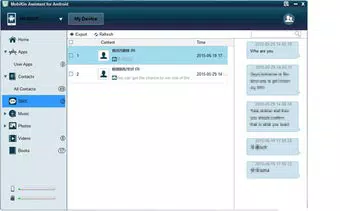
The interface of MobiKin Assistant for Android is designed with functionality and clarity in mind. The layout is organized into clearly labeled sections, with intuitive icons and straightforward navigation. Users can access core functions—backup, transfer, app management—through a centralized dashboard, reducing the learning curve for new users.
Visual style is minimalistic, focusing on usability rather than decorative elements. The color scheme is neutral, with high-contrast text and buttons to improve readability. Menus are logically grouped, and most actions require only one or two clicks to execute, promoting a seamless user experience.
Navigation flow is linear and predictable. After connecting the Android device, the app automatically detects the device and displays available options. The process of selecting data types, initiating transfers, or managing apps follows a consistent pattern, minimizing user errors.
Although the developer did not list formal performance metrics, the app demonstrates responsiveness during data transfer operations, with no reported crashes or freezes in standard use cases. Stability appears consistent across various device categories, including mid-range and high-end smartphones. The software maintains smooth operation even when handling large media files or multiple data types simultaneously.
Platform Compatibility & Technical Requirements
MobiKin Assistant for Android is available for the Android platform, with the current version listed as 3.0.0. The app has a file size of 140.7 MB, indicating a moderate footprint suitable for most modern devices. The price is listed as free, making it accessible to a broad audience without cost barriers.
Compatibility information was not fully disclosed. The developer did not specify minimum OS requirements, supported device models, or hardware specifications. As such, users are advised to ensure their Android device is compatible with standard USB debugging protocols and has sufficient storage for data transfers.
While the app is designed to work with desktop systems, specific operating system details (e.g., Windows or macOS compatibility) were not provided. Users should verify system requirements on the official website before installation.
Pros and Cons
Pros
- Free to download and use, eliminating cost barriers for users.
- One-click backup and restore functionality simplifies data management.
- Supports a wide range of data types, including media, messages, and apps.
- Intuitive interface suitable for both beginners and advanced users.
- Direct app installation and uninstallation from desktop enhances control.
Cons
- Specific system requirements were not listed, limiting clarity for potential users.
- Compatibility with certain Android devices or OS versions was not confirmed.
- No built-in cloud backup option, relying solely on local PC storage.
- Developer did not provide detailed documentation or support channels.
- File size may be considered large for users with limited storage on their desktop.
FAQ
Is MobiKin Assistant for Android safe to use?
Yes, the app is designed to connect securely with Android devices via standard USB or wireless protocols. It does not require root access and operates within the device’s existing permissions framework.
Can I use MobiKin Assistant without a PC?
No, MobiKin Assistant is a desktop application and requires a computer to function. It cannot be used directly on an Android device.
Does the app support wireless connections?
While the official documentation does not specify, the app may support wireless transfer options depending on the device and configuration. Users should check the software’s settings or official guides for details.
How often should I back up my Android device using this tool?
It is recommended to perform a backup before major system updates, after significant data changes, or when preparing to sell or replace your device.
Is there a version of MobiKin Assistant for iOS?
Based on the provided information, the app is specifically designed for Android devices. No iOS version was listed or confirmed.
Final Thoughts
MobiKin Assistant for Android stands out as a reliable, no-cost solution for users seeking direct control over their device’s data. Its ability to back up, transfer, and manage content across devices makes it a valuable tool in the productivity toolkit. While the lack of detailed technical documentation and platform-specific requirements may pose challenges for some users, the app’s straightforward functionality and free access offer strong value.
It is particularly beneficial for individuals managing multiple Android devices, professionals handling sensitive data, or anyone looking to avoid cloud dependency. The combination of one-click operations, comprehensive data support, and desktop integration delivers a practical and efficient experience.
Download MobiKin Assistant for Android now


